Stop wrestling with email templates. Use React Email
Stop wrestling with email templates. Use React Email
By Tim D'hoore
5 min read
Email development has long been stuck in the past. React Email is here to change that.

- Authors

- Name
- Tim D'hoore
Stop wrestling with email templates. Use React Email
Standard email templating feels like stepping into a time machine back to the 90s. The old layout and styling techniques are a stark reminder of how far web development has come. Yet email clients have remained frozen in that era, largely for the sake of compatibility.
The simplest of designs can require an enormous amount of code to get right, and even then there's no guarantee it'll render correctly in every email client. I find this particularly frustrating when working alongside talented colleagues who expect modern tooling to match modern expectations.
Thankfully, there are better ways to build emails today. In this article, I'll take a look at one of those tools: React Email.
What Is React Email?
React Email is a modern library for building and testing HTML emails using React. There are other options out there, and they each have their merits. But I chose React Email for its simplicity, its excellent set of default components, and its first-class Tailwind CSS integration.

Building an Email
The Basics
React Email works exactly as you'd expect React to work. Everything is broken down into components. You use the library's built-in components to construct your layout, and build your own custom components for more specific needs.
Project Setup
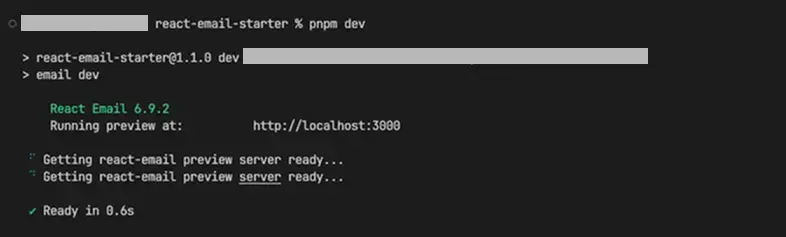
React Email can be set up automatically or manually. Full instructions are available in the official documentation. Either approach gives you access to three key commands:
build: Copies the preview app to .react-email and builds itdev: Starts the local editor and preview serverexport: Compiles your email templates to .HTML files in the out folder
Folder Structure and File Setup
Run dev to start the local development server. Create your email templates inside the emails folder using either a .jsx or .tsx extension. All components live in this folder and can be exported later.
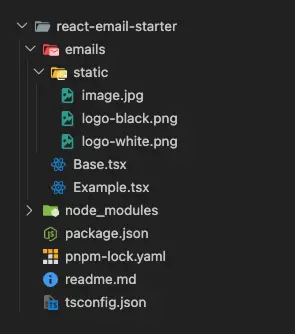
As a working example, I'll build a simple example email using two files: example.tsx and base.tsx.
Note: Any components that you don't want to show up in the export .out folder can be placed inside the
emails/_componentsfolder.
Example.tsxThe final email template; this must live in the root of theemailsfolderBase.tsxA base template responsible for:- The base HTML structure
- Tailwind configuration and variables
- Header (or this can be its own file)
- Footer (or this can be its own file)
Working With Components
Built-in and Custom Components
React Email provides everything you need to construct an email layout. The components documentation is thorough and well-organised. These components can be styled using Tailwind. Though it's worth keeping in mind that not every tailwind class will work perfectly, since the output ultimately runs inside an email client.
Building Out the Base Template
Starting with base.tsx, I add brand colours, default fonts, and most importantly the pixelBasedPreset. This tells Tailwind to use pixels instead of rem values, which would otherwise be incompatible with most email clients.
I also add a <style> tag for dark mode CSS. Tailwind's built-in dark mode support doesn't translate well to email, so defining the correct colours manually in the header is the more reliable approach.
Note: Dark mode overrides may not appear in the editor preview, but will display correctly in your actual email client.
Finally, I add a children prop to the base component. This works exactly like any other React component, so you're free to extend it with additional props as needed.
import { Head, Html, Body, Tailwind, pixelBasedPreset, Container, Img } from 'react-email'
export default function Base({ children }) {
return (
<Tailwind
config={{
presets: [pixelBasedPreset],
theme: {
extend: {
colors: {
brand: '#0017EE',
'brand-foreground': '#ffffff',
forground: '#232323',
bg: '#FFFFFF',
},
font: {
sans: 'Arial, Helvetica, sans-serif',
},
},
},
}}
>
<Html className="bg-white dark-bg">
<Head>
<title>iO digital | </title>
<meta content="light dark" name="color-scheme" />
<meta content="light dark" name="supported-color-schemes" />
<style
type="text/css"
dangerouslySetInnerHTML={{
__html: `
:root {color-scheme: light dark;}
.bg, .bg > table { background: #ffffff !important; }
@media (prefers-color-scheme: dark) {
.bg, .bg > table { background: #000000 !important; }
.dark-text
{ color: #ffffff !important; }
.bg-brand {
background: #0017EE !important;
}
}`,
}}
/>
</Head>
<Body className="font-sans text-base leading-6 text-forground dark-text bg-white bg">
<Container className="bg-brand px-4">
<!-- Use an absolute/CDN URL for production -->
<Img src="/static/logo-white.png" alt="iO digital" width={80} />
</Container>
<Container>{children}</Container>
<Container className="bg-brand px-4 py-6 text-center text-brand-foreground ">
© 2026 iO digital
</Container>
</Body>
</Html>
</Tailwind>
)
}
Using the Editor
With the base template in place, it's time to build out the example email. Before diving in, the built-in editor is worth exploring. It provides a live preview of all your templates and components, and includes everything you need to test your email.
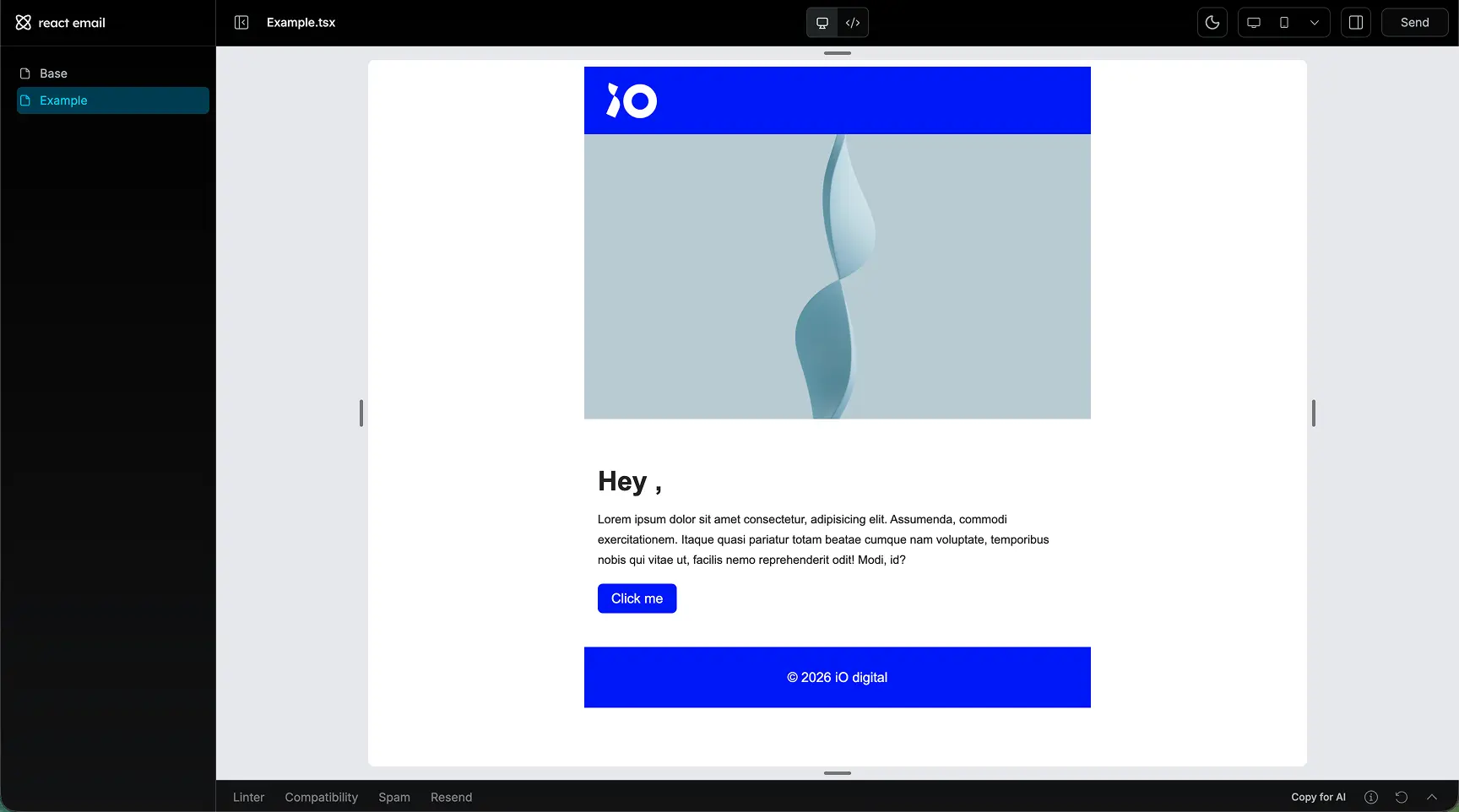
Once you're happy with the result, the editor lets you:
- Test responsiveness: Check how your email adapts to different screen widths
- Preview dark mode: Note that this is browser-based, so it's not always a perfect representation; always test across several major email clients
- Send a test email: At any point during development, you can send a live test to yourself to see the email under real-world conditions
Exporting Your Template
There are two ways to export a finished email template.
Node.js Integration
If you're working in a Node.js environment, you can use React Email's render() function to export templates directly to HTML with dynamic variables included. The integrations overview covers a wide range of setups and frameworks.
Plain HTML Export
Just need the HTML file? The export command compiles your templates to static HTML files in the .out folder. Keep in mind that these static exports won't support dynamic variables. You'll need to inject those separately.
//input code

import { Column, Row, Text, Heading, Button, Img } from 'react-email'
import Base from './Base'

export default function Example({ name }) {
  return (
    <Base>
      <Row>
        <Column>
          <Img src="/static/image.jpg" alt="placeholder image" className="max-w-full" />
        </Column>
      </Row>
      <Row>
        <Column className="py-10 px-4">
          <Heading as="h1">Hey {name},</Heading>
          <Text>
            Lorem ipsum dolor sit amet consectetur, adipisicing elit. Assumenda, commodi
            exercitationem. Itaque quasi pariatur totam beatae cumque nam voluptate, temporibus
            nobis qui vitae ut, facilis nemo reprehenderit odit! Modi, id?
          </Text>

          <Button
            href="https://www.iodigital.com"
            className="bg-brand px-4 py-2 rounded-md text-brand-foreground"
          >
            Click me
          </Button>
        </Column>
      </Row>
    </Base>
  )
}
<!-- output html -->
<!DOCTYPE html PUBLIC "-//W3C//DTD XHTML 1.0 Transitional//EN" "http://www.w3.org/TR/xhtml1/DTD/xhtml1-transitional.dtd">
<html class="dark-bg" dir="ltr" lang="en" style="background-color:rgb(255,255,255)">
<head>
<meta content="text/html; charset=UTF-8" http-equiv="Content-Type" />
<meta name="x-apple-disable-message-reformatting" />
<title>iO digital |</title>
<meta content="light dark" name="color-scheme" />
<meta content="light dark" name="supported-color-schemes" />
<style></style>
<style type="text/css">
:root {
color-scheme: light dark;
}
.bg,
.bg > table {
background: #ffffff !important;
}
@media (prefers-color-scheme: dark) {
.bg,
.bg > table {
background: #000000 !important;
}
.dark-text {
color: #ffffff !important;
}
.bg-brand {
background: #0017ee !important;
}
}
</style>
</head>
<body class="dark-text bg" dir="ltr" lang="en" style="background-color:rgb(255,255,255)">
<!--$--><!--html--><!--head--><!--body-->
<table
border="0"
width="100%"
cellpadding="0"
cellspacing="0"
role="presentation"
align="center"
>
<tbody>
<tr>
<td
dir="ltr"
lang="en"
style="font-family:Arial,Helvetica,sans-serif;font-size:16px;line-height:24px;color:rgb(35,35,35);background-color:rgb(255,255,255)"
>
<table
align="center"
width="100%"
border="0"
cellpadding="0"
cellspacing="0"
role="presentation"
style="max-width:37.5em;background-color:rgb(0,23,238)"
>
<tbody>
<tr style="width:100%">
<td style="padding-right:16px;padding-left:16px">
<!-- Use an absolute/CDN URL for production -->
<img
alt="iO digital"
src="/static/logo-white.png"
style="display:block;outline:none;border:none;text-decoration:none"
width="80"
/>
</td>
</tr>
</tbody>
</table>
<table
align="center"
width="100%"
border="0"
cellpadding="0"
cellspacing="0"
role="presentation"
style="max-width:37.5em"
>
<tbody>
<tr style="width:100%">
<td>
<table
align="center"
width="100%"
border="0"
cellpadding="0"
cellspacing="0"
role="presentation"
>
<tbody style="width:100%">
<tr style="width:100%">
<td data-id="__react-email-column">
<img
alt="placeholder image"
src="/static/image.jpg"
style="display:block;outline:none;border:none;text-decoration:none;max-width:100%"
/>
</td>
</tr>
</tbody>
</table>
<table
align="center"
width="100%"
border="0"
cellpadding="0"
cellspacing="0"
role="presentation"
>
<tbody style="width:100%">
<tr style="width:100%">
<td
data-id="__react-email-column"
style="padding-bottom:40px;padding-top:40px;padding-right:16px;padding-left:16px"
>
<h1>
Hey
<!-- -->,
</h1>
<p
style="font-size:14px;line-height:24px;margin-top:16px;margin-bottom:16px"
>
Lorem ipsum dolor sit amet consectetur, adipisicing elit. Assumenda,
commodi exercitationem. Itaque quasi pariatur totam beatae cumque nam
voluptate, temporibus nobis qui vitae ut, facilis nemo reprehenderit
odit! Modi, id?
</p>
<a
href="https://www.iodigital.com"
style="line-height:100%;text-decoration:none;display:inline-block;max-width:100%;mso-padding-alt:0px;background-color:rgb(0,23,238);padding-right:16px;padding-left:16px;padding-bottom:8px;padding-top:8px;border-radius:0.375rem;color:rgb(255,255,255)"
target="_blank"
><span
><!--[if mso
]><i style="mso-font-width:400%;mso-text-raise:12px" hidden
>  </i
><!
[endif]--></span
><span
style="max-width:100%;display:inline-block;line-height:120%;mso-padding-alt:0px;mso-text-raise:6px"
>Click me</span
><span
><!--[if mso
]><i style="mso-font-width:400%" hidden
>  ​</i
><!
[endif]--></span
></a
>
</td>
</tr>
</tbody>
</table>
</td>
</tr>
</tbody>
</table>
<table
align="center"
width="100%"
border="0"
cellpadding="0"
cellspacing="0"
role="presentation"
style="max-width:37.5em;background-color:rgb(0,23,238);text-align:center;color:rgb(255,255,255)"
>
<tbody>
<tr style="width:100%">
<td
style="padding-right:16px;padding-left:16px;padding-bottom:24px;padding-top:24px"
>
© 2026 iO digital
</td>
</tr>
</tbody>
</table>
</td>
</tr>
</tbody>
</table>
<!--/$-->
</body>
</html>
Conclusion
React Email addresses many of the most painful aspects of email development. From more readable code to a vastly improved styling workflow. The difference compared to traditional email templating is significant, and I find it genuinely makes building emails an enjoyable experience rather than a frustrating one. Which of these two code bases is more readable?
with regular html
<!DOCTYPE html PUBLIC "-//W3C//DTD XHTML 1.0 Transitional//EN" "http://www.w3.org/TR/xhtml1/DTD/xhtml1-transitional.dtd">
<html class="dark-bg" dir="ltr" lang="en" style="background-color:rgb(255,255,255)">
<head>
<meta content="text/html; charset=UTF-8" http-equiv="Content-Type" />
<meta name="x-apple-disable-message-reformatting" />
<title>iO digital |</title>
<meta content="light dark" name="color-scheme" />
<meta content="light dark" name="supported-color-schemes" />
<style></style>
<style type="text/css">
:root {
color-scheme: light dark;
}
.bg,
.bg > table {
background: #ffffff !important;
}
@media (prefers-color-scheme: dark) {
.bg,
.bg > table {
background: #000000 !important;
}
.dark-text {
color: #ffffff !important;
}
.bg-brand {
background: #0017ee !important;
}
}
</style>
</head>
<body class="dark-text bg" dir="ltr" lang="en" style="background-color:rgb(255,255,255)">
<!--$--><!--html--><!--head--><!--body-->
<table
border="0"
width="100%"
cellpadding="0"
cellspacing="0"
role="presentation"
align="center"
>
<tbody>
<tr>
<td
dir="ltr"
lang="en"
style="font-family:Arial,Helvetica,sans-serif;font-size:16px;line-height:24px;color:rgb(35,35,35);background-color:rgb(255,255,255)"
>
<table
align="center"
width="100%"
border="0"
cellpadding="0"
cellspacing="0"
role="presentation"
style="max-width:37.5em;background-color:rgb(0,23,238)"
>
<tbody>
<tr style="width:100%">
<td style="padding-right:16px;padding-left:16px">
<img
alt="iO digital"
src="/static/logo-white.png"
style="display:block;outline:none;border:none;text-decoration:none"
width="80"
/>
</td>
</tr>
</tbody>
</table>
<table
align="center"
width="100%"
border="0"
cellpadding="0"
cellspacing="0"
role="presentation"
style="max-width:37.5em"
>
<tbody>
<tr style="width:100%">
<td>
<table
align="center"
width="100%"
border="0"
cellpadding="0"
cellspacing="0"
role="presentation"
>
<tbody style="width:100%">
<tr style="width:100%">
<td data-id="__react-email-column">
<img
alt="placeholder image"
src="/static/image.jpg"
style="display:block;outline:none;border:none;text-decoration:none;max-width:100%"
/>
</td>
</tr>
</tbody>
</table>
<table
align="center"
width="100%"
border="0"
cellpadding="0"
cellspacing="0"
role="presentation"
>
<tbody style="width:100%">
<tr style="width:100%">
<td
data-id="__react-email-column"
style="padding-bottom:40px;padding-top:40px;padding-right:16px;padding-left:16px"
>
<h1>
Hey
<!-- -->,
</h1>
<p
style="font-size:14px;line-height:24px;margin-top:16px;margin-bottom:16px"
>
Lorem ipsum dolor sit amet consectetur, adipisicing elit. Assumenda,
commodi exercitationem. Itaque quasi pariatur totam beatae cumque nam
voluptate, temporibus nobis qui vitae ut, facilis nemo reprehenderit
odit! Modi, id?
</p>
<a
href="https://www.iodigital.com"
style="line-height:100%;text-decoration:none;display:inline-block;max-width:100%;mso-padding-alt:0px;background-color:rgb(0,23,238);padding-right:16px;padding-left:16px;padding-bottom:8px;padding-top:8px;border-radius:0.375rem;color:rgb(255,255,255)"
target="_blank"
><span
><!--[if mso
]><i style="mso-font-width:400%;mso-text-raise:12px" hidden
>  </i
><!
[endif]--></span
><span
style="max-width:100%;display:inline-block;line-height:120%;mso-padding-alt:0px;mso-text-raise:6px"
>Click me</span
><span
><!--[if mso
]><i style="mso-font-width:400%" hidden
>  ​</i
><!
[endif]--></span
></a
>
</td>
</tr>
</tbody>
</table>
</td>
</tr>
</tbody>
</table>
<table
align="center"
width="100%"
border="0"
cellpadding="0"
cellspacing="0"
role="presentation"
style="max-width:37.5em;background-color:rgb(0,23,238);text-align:center;color:rgb(255,255,255)"
>
<tbody>
<tr style="width:100%">
<td
style="padding-right:16px;padding-left:16px;padding-bottom:24px;padding-top:24px"
>
© 2026 iO digital
</td>
</tr>
</tbody>
</table>
</td>
</tr>
</tbody>
</table>
<!--/$-->
</body>
</html>
with react email
import { Column, Row, Text, Heading, Button, Img } from 'react-email'
import Base from './_components/Base'

export default function Example({ name }) {
  return (
    <Base>
      <Row>
        <Column>
          <Img src="/static/image.jpg" alt="placeholder image" className="max-w-full" />
        </Column>
      </Row>
      <Row>
        <Column className="py-10 px-4">
          <Heading as="h1">Hey {name},</Heading>
          <Text>
            Lorem ipsum dolor sit amet consectetur, adipisicing elit. Assumenda, commodi
            exercitationem. Itaque quasi pariatur totam beatae cumque nam voluptate, temporibus
            nobis qui vitae ut, facilis nemo reprehenderit odit! Modi, id?
          </Text>

          <Button
            href="https://www.iodigital.com"
            className="bg-brand px-4 py-2 rounded-md text-brand-foreground"
          >
            Click me
          </Button>
        </Column>
      </Row>
    </Base>
  )
}
I know what I will be using in the future. If you're regularly building HTML emails, it's well worth adding to your toolkit and remember to always check your emails in several email clients to ensure everything is working as intended. At the end of the day it's still email development.