Spring Boot: Handling the OAuth2 Login Flow
Spring Boot: Handling the OAuth2 Login Flow
By Ashish Mahajan
7 min read
How Spring Security wires up Azure AD authentication so your frontend never has to touch a token.
- Authors

- Name
- Ashish Mahajan
The problem with "just use Bearer tokens"
When you start a new web app and need authentication, the path of least resistance seems obvious: protect your API with Bearer tokens, let the frontend handle the login, store the JWT in localStorage, and call it a day.
That approach works — until it doesn't. localStorage is accessible to any JavaScript running on the page, which makes it a prime target for XSS attacks — as OWASP's HTML5 Security Cheat Sheet explicitly warns against storing sensitive data there. And once you start managing token refresh cycles in the SPA (Single Page Application), you've added a layer of complexity that lives in every browser session — a problem the IETF addresses directly in RFC 10017: OAuth 2.0 for Browser-Based Applications and RFC 9700: OAuth 2.0 Security Best Current Practice.
There's a cleaner alternative: let the backend own the auth flow entirely. The frontend redirects to login, Spring Boot handles the OAuth2 dance, and all the frontend ever sees is an HttpOnly session cookie. No tokens in JavaScript. No refresh logic in the SPA.
This article walks through exactly that pattern, grounded in a real Spring Boot + Azure AD setup.
How the flow works
Here's the full auth lifecycle at a glance:
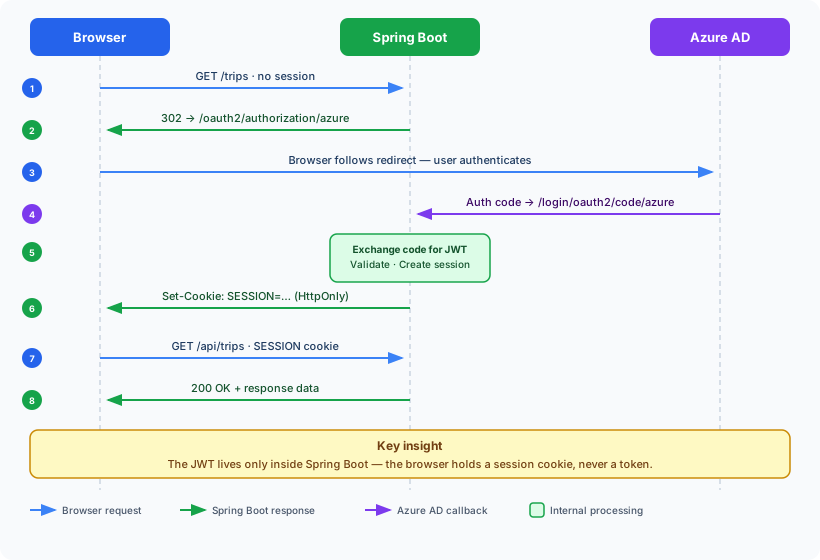
The JWT exists only inside Spring Boot — the browser holds a session cookie and never sees the token directly.
Setting up OAuth2 Login in Spring Boot
Dependencies
Start with spring-boot-starter-oauth2-client and spring-boot-starter-security:
<!-- pom.xml -->
<dependencies>
    <dependency>
        <groupId>org.springframework.boot</groupId>
        <artifactId>spring-boot-starter-oauth2-client</artifactId>
    </dependency>
    <dependency>
        <groupId>org.springframework.boot</groupId>
        <artifactId>spring-boot-starter-security</artifactId>
    </dependency>
    <dependency>
        <groupId>org.springframework.boot</groupId>
        <artifactId>spring-boot-starter-web</artifactId>
    </dependency>
</dependencies>
Or with Gradle:
// build.gradle
dependencies {
    implementation 'org.springframework.boot:spring-boot-starter-oauth2-client'
    implementation 'org.springframework.boot:spring-boot-starter-security'
    implementation 'org.springframework.boot:spring-boot-starter-web'
}
Application config
Configure Azure AD as the OAuth2 provider in application.yml:
spring:
  security:
    oauth2:
      client:
        registration:
          azure:
            client-id: ${OAUTH2_CLIENT_ID}
            client-secret: ${OAUTH2_CLIENT_SECRET}
            authorization-grant-type: authorization_code
            redirect-uri: '{baseUrl}/login/oauth2/code/{registrationId}'
            scope:
              - openid
              - profile
              - email
        provider:
          azure:
            issuer-uri: https://login.microsoftonline.com/${OAUTH2_TENANT_ID}/v2.0
A few things to note:
client-idandclient-secretcome from environment variables — never hardcode them.issuer-urilets Spring auto-discover the OIDC endpoints (token, userinfo, JWKS) from Azure AD's metadata document.- For local dev, you override
issuer-uriinapplication-local.ymlto point at a mock OAuth server instead.
Security config
application.yml handles what Azure AD tenant to connect to, but it can't express how requests should be authorized — which paths are public, which require a logged-in user, what origins are allowed for CORS. Those rules are behavioral logic, not configuration values, so Spring Security exposes them through a Java/Kotlin API rather than YAML keys.
SecurityConfig is the class that holds all of that logic. The two annotations on it do distinct things:
@Configurationtells Spring to treat this class as a source of bean definitions. Any method annotated with@Beaninside it will be registered in the application context and injected wherever it's needed. Without@Configuration, Spring would not process the@Beanmethods.@EnableWebSecurityactivates the Spring Security filter chain for a Spring MVC application. Without it, none of the security rules below would take effect — requests would reach your controllers unprotected.
Here's the configuration:
@Configuration
@EnableWebSecurity
public class SecurityConfig {

    private final String apiHost;
    private final String frontendHost;

    public SecurityConfig(String apiHost, String frontendHost) {
        this.apiHost = apiHost;
        this.frontendHost = frontendHost;
    }

    @Bean
    public SecurityFilterChain securityFilterChain(HttpSecurity http) throws Exception {
        return http
            .cors(cors -> cors.configurationSource(corsConfigurationSource()))
            .csrf(AbstractHttpConfigurer::disable)
            .authorizeHttpRequests(auth -> auth
                .requestMatchers("/actuator/health").permitAll()
                .requestMatchers("/v3/api-docs/**", "/swagger-ui/**").permitAll()
                .anyRequest().authenticated()
            )
            .oauth2Login(withDefaults())
            .build();
    }

    @Bean
    public CorsConfigurationSource corsConfigurationSource() {
        CorsConfiguration config = new CorsConfiguration();
        config.setAllowedOrigins(List.of(apiHost, frontendHost));
        config.setAllowedMethods(List.of("GET", "POST", "PUT", "DELETE", "OPTIONS"));
        config.setAllowedHeaders(List.of("*"));
        config.setAllowCredentials(true);
        UrlBasedCorsConfigurationSource source = new UrlBasedCorsConfigurationSource();
        source.registerCorsConfiguration("/**", config);
        return source;
    }
}
The securityFilterChain bean defines three things that have no YAML equivalent:
- Which paths are public.
/actuator/healthand the Swagger/OpenAPI endpoints need to be reachable without a session (by load balancers and API clients respectively). Every other path requires authentication. Spring Security has no YAML syntax for per-path rules — they must be expressed in code. - CORS policy. Allowed origins, methods, and the
allowCredentialsflag are runtime decisions that depend on values injected from config (apiHost,frontendHost). Spring does not provide a YAML-based CORS configuration for WebFlux Security — you must supply aCorsConfigurationSourcebean. - CSRF. Disabled here because the app relies on
SameSitecookie policy rather than CSRF tokens. This is a deliberate security trade-off that must be expressed in code, not config.
When authenticated, .oauth2Login { } does a lot of things behind the scenes. When an unauthenticated request hits a protected route, Spring redirects to /oauth2/authorization/azure, which kicks off the Azure AD login. After the user authenticates, Azure redirects back to /login/oauth2/code/azure, Spring validates the token, creates a session, and sets the cookie.
Note :
- CORS origins are always explicit — never
allowedOrigins = listOf("*"). WithallowCredentials = true, a wildcard origin is both a security risk and a spec violation. - CSRF is disabled — this is safe because the app uses cookie-based session auth with SameSite cookie policy and the API is only called from the same origin.
Extracting the user from the JWT
After login, every request carries the session cookie. Spring resolves it to an Authentication object. To get the current user's identity, inject @AuthenticationPrincipal into your controllers:
@RestController
@RequestMapping("/api/trips")
public class TripController {

    private final TripService tripService;

    public TripController(TripService tripService) {
        this.tripService = tripService;
    }

    @GetMapping
    public List<TripDto> getTrips(@AuthenticationPrincipal OidcUser principal) {
        String userId = principal.getSubject(); // the `sub` claim from the JWT
        return tripService.findTrips(userId);
    }
}
The sub claim is the stable, unique identifier Azure AD issues per user. It's what you store in your database as the user's identity — not their email, which can change.
A common pattern is to provision a user row on their first authenticated call:
@Service
public class UserService {

    private final UserRepository userRepository;

    public UserService(UserRepository userRepository) {
        this.userRepository = userRepository;
    }

    public UserEntity getOrProvision(OidcUser principal) {
        String sub = principal.getSubject();
        return userRepository.findBySub(sub)
            .orElseGet(() -> userRepository.save(new UserEntity(sub, principal.getEmail())));
    }
}
Handling 401s and 403s in the SPA
Because auth is fully server-side, the SPA never explicitly checks whether a session is valid. Instead, configure your HTTP client to intercept error responses globally. It is important to handle 401 and 403 separately — they mean different things:
- 401 Unauthorized — no valid session exists. The correct response is to redirect the user to the Azure AD login page so they can authenticate.
- 403 Forbidden — the user is authenticated but does not have permission to access that resource. Redirecting to login is the wrong move here: the user will log in again and immediately receive another
403. Instead, route them to a dedicated access-denied page.
// customAxios.ts
axios.interceptors.response.use(
  (response) => response,
  (error) => {
    if (error.response?.status === 401) {
      window.location.href = '/oauth2/authorization/azure'
    } else if (error.response?.status === 403) {
      window.location.href = '/access-denied'
    }
    return Promise.reject(error)
  }
)
When the session expires, the next API call returns 401, the interceptor redirects to Azure AD login, and after re-authentication the user lands back in the app. No explicit session-expired state needed in any component.
The /access-denied route should render a clear message explaining that the user's account does not have the required permissions, and ideally provide a way to contact the relevant team or admin.
Local development without Azure AD
Requiring a live Azure AD tenant for every local dev session is painful. The solution is a local mock OAuth2 server that speaks the same OIDC protocol.
A minimal mock server using Node.js + node-oidc-provider:
// local-oauth/main.js
const { Provider } = require('oidc-provider')

const provider = new Provider('http://localhost:8081', {
  clients: [
    {
      client_id: 'local-client',
      client_secret: 'local-secret',
      redirect_uris: ['http://localhost:8080/login/oauth2/code/azure'],
      grant_types: ['authorization_code'],
    },
  ],
  findAccount: async (ctx, id) => ({
    accountId: id,
    claims: async () => ({
      sub: 'test-user-sub',
      email: 'dev@example.com',
    }),
  }),
})

provider.listen(8081)
Then in application-local.yml, override the issuer:
spring:
  security:
    oauth2:
      client:
        provider:
          azure:
            issuer-uri: http://localhost:8081
Spring auto-discovers the OIDC metadata from the mock server the same way it would from Azure AD. Developers get a one-click login with no real credentials required.
What about reactive (WebFlux) specifics?
If you're on Spring WebFlux (reactive, non-blocking), the OAuth2 login flow is identical — the same application.yml config works without changes. Only the Security API types differ. Replace spring-boot-starter-web with spring-boot-starter-webflux in your dependencies, then adjust the three classes below.
Security config (WebFlux)
Swap @EnableWebSecurity / HttpSecurity / SecurityFilterChain for their WebFlux counterparts:
Kotlin:
@Configuration
@EnableWebFluxSecurity
class SecurityConfig(
    private val apiHost: String,
    private val frontendHost: String,
) {
    @Bean
    fun securityFilterChain(http: ServerHttpSecurity): SecurityWebFilterChain =
        http
            .cors { it.configurationSource(corsConfigurationSource()) }
            .csrf { it.disable() }
            .authorizeExchange { exchanges ->
                exchanges
                    .pathMatchers("/actuator/health").permitAll()
                    .pathMatchers("/v3/api-docs/**", "/swagger-ui/**").permitAll()
                    .anyExchange().authenticated()
            }
            .oauth2Login { }
            .build()

    @Bean
    fun corsConfigurationSource(): CorsConfigurationSource {
        val config = CorsConfiguration().apply {
            allowedOrigins = listOf(apiHost, frontendHost)
            allowedMethods = listOf("GET", "POST", "PUT", "DELETE", "OPTIONS")
            allowedHeaders = listOf("*")
            allowCredentials = true
        }
        return UrlBasedCorsConfigurationSource().apply {
            registerCorsConfiguration("/**", config)
        }
    }
}
Java:
@Configuration
@EnableWebFluxSecurity
public class SecurityConfig {

    private final String apiHost;
    private final String frontendHost;

    public SecurityConfig(String apiHost, String frontendHost) {
        this.apiHost = apiHost;
        this.frontendHost = frontendHost;
    }

    @Bean
    public SecurityWebFilterChain securityFilterChain(ServerHttpSecurity http) {
        return http
            .cors(cors -> cors.configurationSource(corsConfigurationSource()))
            .csrf(ServerHttpSecurity.CsrfSpec::disable)
            .authorizeExchange(exchanges -> exchanges
                .pathMatchers("/actuator/health").permitAll()
                .pathMatchers("/v3/api-docs/**", "/swagger-ui/**").permitAll()
                .anyExchange().authenticated()
            )
            .oauth2Login(withDefaults())
            .build();
    }

    @Bean
    public CorsConfigurationSource corsConfigurationSource() {
        CorsConfiguration config = new CorsConfiguration();
        config.setAllowedOrigins(List.of(apiHost, frontendHost));
        config.setAllowedMethods(List.of("GET", "POST", "PUT", "DELETE", "OPTIONS"));
        config.setAllowedHeaders(List.of("*"));
        config.setAllowCredentials(true);
        UrlBasedCorsConfigurationSource source = new UrlBasedCorsConfigurationSource();
        source.registerCorsConfiguration("/**", config);
        return source;
    }
}
Controller and service (WebFlux)
@AuthenticationPrincipal still works in WebFlux, but return types become reactive. In Kotlin this is expressed with suspend fun; in Java with Mono<T>:
Kotlin:
@RestController
@RequestMapping("/api/trips")
class TripController(private val tripService: TripService) {

    @GetMapping
    suspend fun getTrips(
        @AuthenticationPrincipal principal: OidcUser
    ): List<TripDto> {
        val userId = principal.subject
        return tripService.findTrips(userId)
    }
}

@Service
class UserService(private val userRepository: UserRepository) {

    suspend fun getOrProvision(principal: OidcUser): UserEntity =
        withContext(Dispatchers.IO) {
            val sub = principal.subject
            userRepository.findBySub(sub)
                ?: userRepository.save(UserEntity(sub = sub, email = principal.email))
        }
}
Java:
@RestController
@RequestMapping("/api/trips")
public class TripController {

    private final TripService tripService;

    public TripController(TripService tripService) {
        this.tripService = tripService;
    }

    @GetMapping
    public Mono<List<TripDto>> getTrips(@AuthenticationPrincipal OidcUser principal) {
        String userId = principal.getSubject();
        return tripService.findTrips(userId);
    }
}

@Service
public class UserService {

    private final UserRepository userRepository;

    public UserService(UserRepository userRepository) {
        this.userRepository = userRepository;
    }

    public Mono<UserEntity> getOrProvision(OidcUser principal) {
        String sub = principal.getSubject();
        return userRepository.findBySub(sub)
            .switchIfEmpty(userRepository.save(new UserEntity(sub, principal.getEmail())));
    }
}
Blocking calls in WebFlux
For any JPA/database access inside a suspend fun, wrap it in withContext(Dispatchers.IO) — JPA is blocking, and calling it on the reactor event loop will deadlock or throw. In Java, use Schedulers.boundedElastic():
Kotlin:
suspend fun findUser(sub: String): UserEntity? =
    withContext(Dispatchers.IO) {
        userRepository.findBySub(sub)
    }
Java:
public Mono<UserEntity> findUser(String sub) {
    return Mono.fromCallable(() -> userRepository.findBySub(sub))
        .subscribeOn(Schedulers.boundedElastic());
}
The payoff
By the time this is wired up, the security posture of the SPA is meaningfully improved:
| Concern | Bearer token in localStorage | Cookie-based session (this approach) |
|---|---|---|
| XSS token theft | Vulnerable | Not possible — cookie is HttpOnly |
| Token refresh complexity | In every SPA | Handled by Spring session |
| Auth logic in frontend | Yes | No — global 401 interceptor only |
| Token visible to JavaScript | Yes | No |
The tradeoff is that your backend is now stateful — each session requires storage. For internal enterprise apps with hundreds of concurrent users (not millions), that's a reasonable tradeoff.
Summary
Spring Boot's oauth2Login() gives you a complete, secure auth flow in a handful of config lines. The browser redirects, Azure AD authenticates, Spring validates the JWT and issues a session cookie — and your React SPA is blissfully unaware that a JWT was ever involved.
The pattern works especially well for internal enterprise tools where you control both the frontend and backend, SSO is already in place via Azure AD, and you want to minimize the security surface exposed to client-side JavaScript.
The full setup shown here is production-ready: environment-injected secrets, explicit CORS origins, a local mock for development, and a single 401(Unauthorized) interceptor in the SPA that handles session expiry transparently.
Appendix
What is a SPA?
A Single-Page Application (SPA) is a web app that loads a single HTML page and dynamically updates content in the browser — without doing a full page reload on every navigation. Frameworks like React, Vue, and Angular are commonly used to build SPAs.
In a traditional multi-page app, the server renders a new HTML page for each route. In a SPA, the browser loads the app once and JavaScript handles routing, data fetching, and rendering from that point on.
This architecture makes SPAs fast and responsive, but it also shifts responsibility: the SPA runs entirely in the browser, which means any data it holds — including auth tokens — is accessible to JavaScript. That's the core tension this article addresses.
What is OIDC?
OpenID Connect (OIDC) is an identity layer built on top of OAuth2. While OAuth2 handles authorization (granting access to resources), OIDC adds authentication (verifying who the user is).
The three key building blocks:
- ID Token — a JWT issued by the identity provider (e.g. Azure AD) containing claims about the user:
sub(stable unique user ID),email,name, and more. - UserInfo endpoint — an API the client can call to fetch additional user profile data beyond what's in the ID Token.
- Discovery document — a well-known URL at
/.well-known/openid-configurationthat advertises all the provider's endpoints: token, userinfo, JWKS (public keys for verifying token signatures). Spring fetches this automatically when you configureissuer-uri.
In practice, this means you configure one URL — the issuer — and Spring handles the rest: token validation, key rotation, user info fetching. No hardcoded endpoint URLs.
The code in this article is based on a real Spring Boot + Azure AD setup. The local OAuth mock uses node-oidc-provider.