Next.js at Enterprise Level
Next.js at Enterprise Level
By Mohi Bagherani
15 min read
Next.js works great out of the box—until traffic and complexity hit. Here’s how to take it to enterprise scale without rewriting everything: from caching and CDN to horizontal scaling, API gateways, and beyond.

- Authors

- Name
- Mohi Bagherani
Next.js is a powerful full-stack framework built on React that enables Server-Side Rendering (SSR) and Static Site Generation (SSG). It allows you to build your UI on the server while providing direct access to server-side resources, such as databases and file systems. Additionally, it streamlines frontend-backend communication through the use of Server Actions.
The framework includes a sophisticated, built-in caching mechanism that requires minimal configuration, making it highly effective for small to medium-sized applications right out of the box.
However, for large-scale enterprise applications, moving into production requires a deeper architectural understanding. To ensure efficiency and robustness at scale, developers must move beyond default settings and master the art of combining advanced optimization techniques.
All the content is human-written and only proofread by AI.
The Problem
At the enterprise level, where scalability is the primary metric for success, applying strategic system design patterns is crucial for maintaining performance and utilizing resources effectively. Relying on default framework configurations is often enough to get started, but as traffic grows, these defaults can become bottlenecks that lead to system instability and increased operational costs.
SLA, SLO, Monitoring Setup
Defining Service Quality: SLA vs. SLO
Before launching any application, we must define the non-functional requirements that dictate the system's success. These are categorized into SLAs and SLOs.
1. The Definitions
SLA (Service Level Agreement): A formal contract with end-users defining the service quality. Failing to meet these often results in financial or legal penalties.
SLO (Service Level Objective): An internal goal we aim to achieve. It is typically stricter than the SLA to provide a "safety buffer" before penalties kick in.
2. Why Clear Goals Matter
Establishing these metrics is essential because they define the "usability" of a system. These goals are often driven by:
- Industry Standards: For example, Core Web Vitals. A page load time exceeding 2 seconds can harm SEO rankings, leading to lower traffic and revenue.
- Competitive Benchmarks: Matching or exceeding the performance of market rivals.
- Safety & Criticality: In high-stakes systems (like self-driving cars), real-time accuracy is a baseline requirement; without it, the system is fundamentally useless.
3. Engineering & Business Alignment
Determining these numbers early allows engineers to orchestrate building blocks and provision resources efficiently. While the business identifies the goals, software engineers must help stakeholders understand the technical trade-offs and the importance of each metric.
Measuring Success: Monitoring & Load Testing
Setting goals is only half the battle; you must verify them through constant measurement.
Phase A: Monitoring We must configure our infrastructure to track non-functional requirements in real-time. This provides the data needed to see if the current implementation meets our defined scores.
Phase B: Load Testing To avoid surprises, we use load testing tools to simulate real-world scenarios. By using virtual users and synthetic traffic, we can stress-test the system before it ever reaches the market.
The Next.js Lifecycle: Server-Side vs. Static
Understanding the internal mechanics of Next.js is essential for scaling. When you move from a single instance to launching dozens of replicas, knowing exactly what happens during a request allows you to predict bottlenecks and manage resources effectively.
1. The Dynamic Request Lifecycle (SSR/ISR)
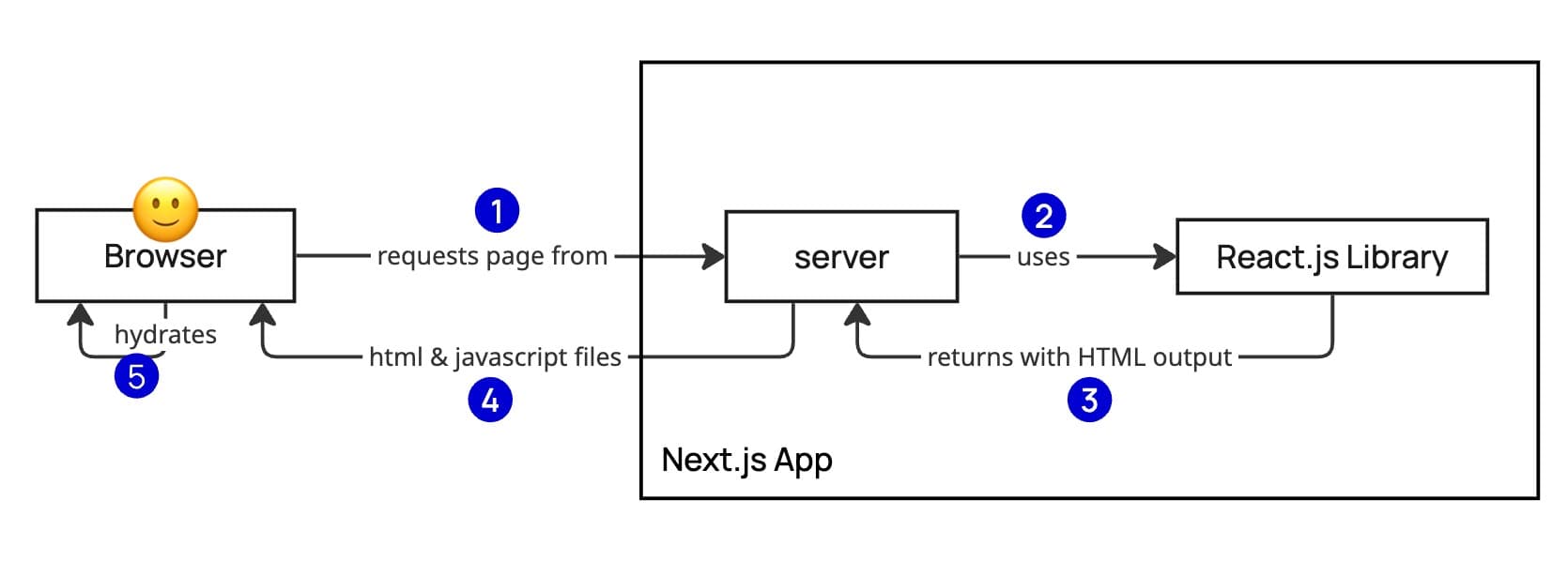
When a user requests a page from a running Next.js application, the server initiates a multi-step process:
- Rendering: Next.js uses its internal React engine to render the requested page on the server.
- Payload Delivery: The server generates and sends back a response containing:
- HTML: For immediate visual rendering in the browser.
- RSC Payload (React Server Components): A specialized data format required for the client-side hydration step.
- Hydration: The browser uses the RSC payload to make the static HTML interactive without requiring a full page reload.
2. The Static Alternative (SSG)
If your application is built entirely without server-side dependencies (fully static), the lifecycle changes significantly:
- Build-Time Generation: All HTML, CSS, and JavaScript files are generated once during the build process.
- Static Hosting: Because there is no logic to execute per request, you do not need a running Node.js server. These files can be served directly from a global CDN or a simple web server (like Nginx or Apache).
- Scaling Advantage: Static sites are inherently easier to scale because they eliminate the CPU overhead of server-side rendering.
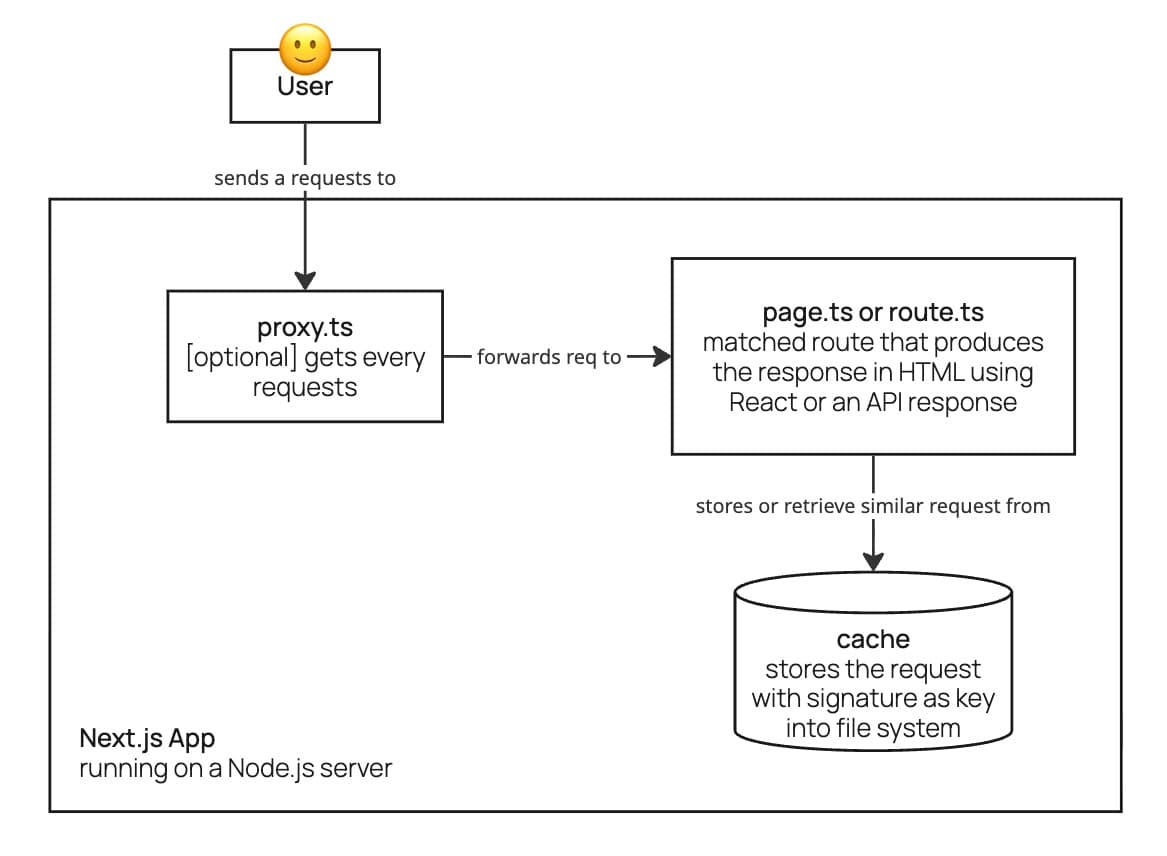
Now, let’s go one level deeper. When a request enters a Next.js application, it is first intercepted by any existing proxy.ts (formerly known as middleware in Next.js <15). This is a stage usually developers decide whether to proceed with the request or reject it—for instance, by performing authentication.
If the request is accepted, it is then handled by the appropriate route based on the URL. At this stage, Next.js first checks its internal cache to see if a similar request has been made before and remains valid. If a valid entry exists, it consumes the cached data for a faster response. If not, Next.js generates the response, serves it, and then caches it for future use.
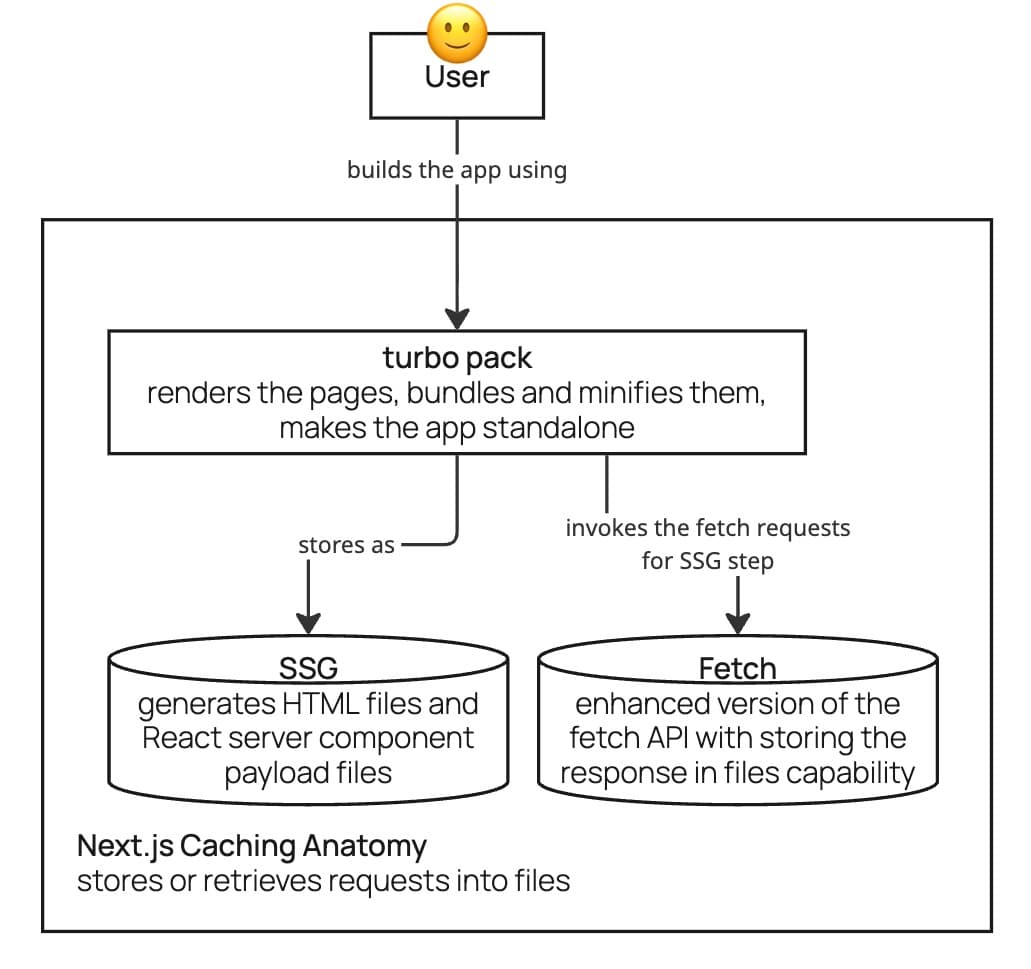
It is worth mentioning that caching in Next.js occurs at several stages. Some of it happens at build time: when a user builds the application, Next.js generates static assets beyond the standard CSS and JS bundles. This includes the HTML output for pages—provided the user utilizes Partial Prerendering (PPR) or avoids server-side capabilities that would otherwise force a page to be fully dynamic.
During this build process, Next.js also produces React Server Component (RSC) payload files, which are stored alongside the other bundle files. This entire method of pre-generating content before a request is made is known as Static Site Generation (SSG).
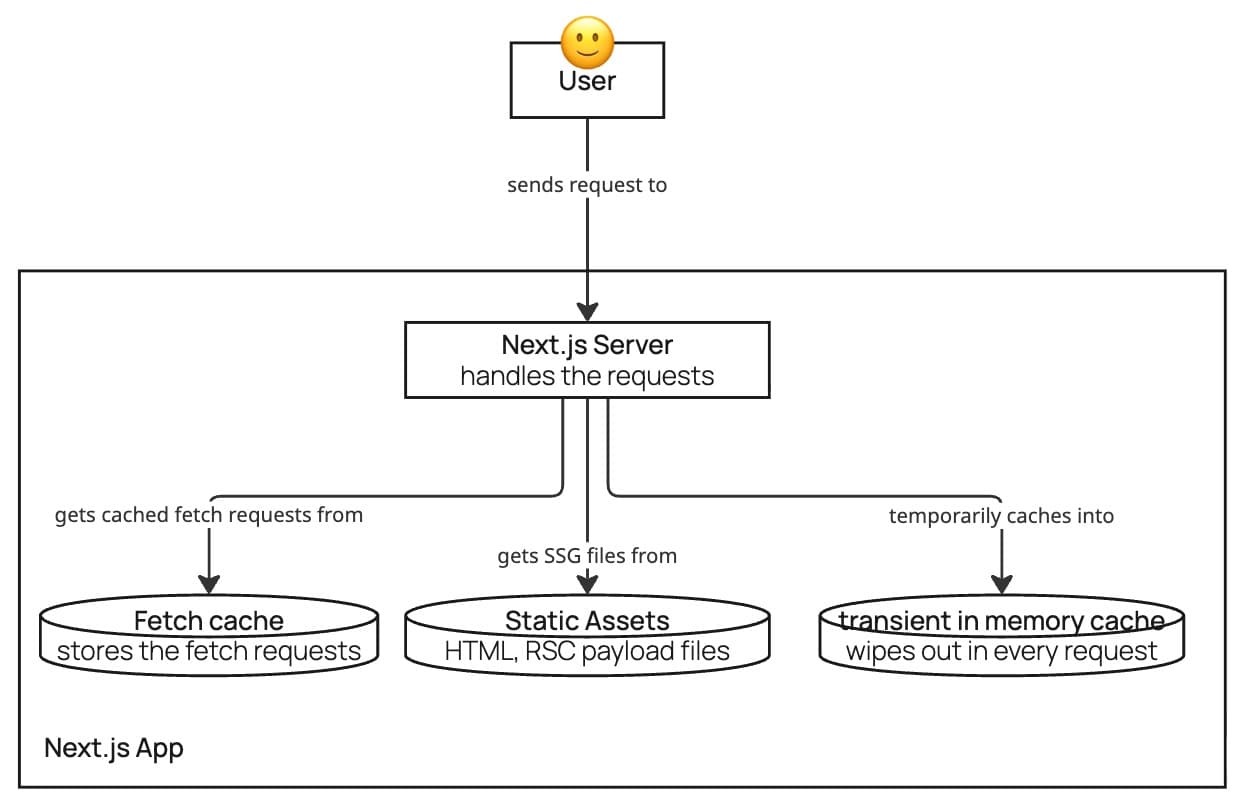
Later, when the application is running, Next.js attempts to locate a matching entry in the cache for every incoming request. This cache can include pre-generated HTML files, React Server Component (RSC) payloads, or the results of fetch requests stored within the file system.
Additionally, if the developer has implemented the React cache function or any other custom caching mechanisms, these will also be utilized to produce the final response more efficiently.
Now that we have explored the request/response lifecycle and the fundamentals of caching in Next.js, a critical question arises: what happens when we run two separate instances of the same application? Will data be duplicated across the caches of each server? Naturally, the answer is yes.
Make Your Next.js App Performant: Easy Wins
Strategy for Scaling: Easy Wins Before Horizontal Scaling
Before moving toward complex horizontal scaling (scaling out), there are several "easy wins" that can make an application robust enough to meet performance goals with minimal effort.
1. Content Delivery Network (CDN)
Implementing a CDN is arguably the biggest Return on Investment (ROI) with the lowest complexity. By simply setting appropriate cache headers in your code and pointing your DNS to a CDN provider, you can achieve a 30–70% reduction in latency. It is a high-impact "set it and forget it" strategy for global performance.
Example 1: Setting Cache-Control headers in a Next.js Route Handler
// /api/hello/route.ts
export async function GET() {
  return NextResponse.json(
    { message: 'Hello World' },
    {
      status: 200,
      headers: {
        // CDN caching: cache for 1 hour, serve stale content during revalidation
        'Cache-Control': 'public, s-maxage=3600, stale-while-revalidate=59',
      },
    }
  )
}
Example 2: Customizing cache headers for static assets
// next.config.ts
const nextConfig: NextConfig = {
  async headers() {
    return [
      {
        // Caches all images in /public/images/ for 30 days at the CDN
        source: '/images/:path*',
        headers: [
          {
            key: 'Cache-Control',
            value: 'public, max-age=2592000, immutable',
          },
        ],
      },
      {
        // Caches JS/CSS chunks generated by Next.js build for 1 year
        source: '/_next/static/:path*',
        headers: [
          {
            key: 'Cache-Control',
            value: 'public, max-age=31536000, immutable',
          },
        ],
      },
    ]
  },
}

export default nextConfig
The first example demonstrates how to set cache headers on an API response for CDN caching. The second example illustrates how to customize cache headers for static images and JavaScript/static files delivered by Next.js in production.
2. Vertical Scaling
Vertical scaling remains a fast and effective way to improve scalability. By analyzing your application logic, you can determine the necessary resource baseline and add a buffer for peak traffic. In most cases, this results in an application that runs smoothly under load with zero code changes required.
3. Coding Best Practices
Adopting modern development techniques can drastically improve performance without infrastructure overhauls:
- Rendering Techniques: Implementing async components and Partial Prerendering (PPR) helps deliver content faster, significantly improving Core Web Vitals.
- DOM Optimization: Reducing DOM size and avoiding deeply nested structures improves rendering speeds on both the server and the client.
- Leveraging Modern Frameworks: Staying updated with the latest versions of Next.js and React provides immediate benefits:
- React 19+: Introduces the React Compiler (enabled via config), which automates memoization for more efficient components.
- Next.js 16+: Provides the use cache directive, allowing you to cache the output of components or Server Actions with far less effort than previous versions.
Partial Prerendering (PPR) is enabled via the cacheComponents flag in Next.js 16+. The static shell is sent immediately; wrap dynamic or async content in <Suspense> so it streams in at request time:
// next.config.ts
const nextConfig: NextConfig = {
  cacheComponents: true,
}
// app/page.tsx – static shell + dynamic content
export default function Page() {
  return (
    <>
      <h1>Static shell (sent immediately)</h1>
      <Suspense fallback={<p>Loading…</p>}>
        <AsyncContent />
      </Suspense>
    </>
  )
}

async function AsyncContent() {
  const data = await fetch('/api/data').then((r) => r.json())
  return <div>{data.message}</div>
}
Horizontal Scaling: Replicas and Load Balancing
Horizontal scaling (or scaling out) is the process of deploying replicas of a service across multiple machines. Instead of relying on a single server, the application is installed on two or more nodes within the infrastructure. A Load Balancer acts as the entry point, distributing incoming traffic among these instances. The Load Balancer is essentially a server running specialized software (such as Nginx) that utilizes specific algorithms to route requests:
- Round Robin: Distributes requests sequentially, giving one to each server in turn.
- Weighted Round Robin: Assigns requests based on the throughput or capacity of each server.
- Least Connections: Sends new requests to the server that currently has the fewest active connections.
- IP Hash: Routes requests based on the client’s IP address so the same user is consistently directed to the same server.
- ...
Architectural Challenges of Scaling Out
Scaling horizontally introduces architectural complexities that must be addressed to ensure system reliability.
1. Achieving Statelessness
To scale effectively, an application should be stateless. This ensures that any replica can handle any incoming request, regardless of the user's previous interactions.
- External State Management: If the application requires state (like user sessions), that data should be moved to a shared resource, such as a database or a global cache.
- Sticky Sessions: If achieving full statelessness is not possible, the Load Balancer can be configured with an IP Hash algorithm. This enables "sticky sessions," ensuring a specific user's requests are always routed to the same server.
2. The Distributed Caching Problem
As discussed in previous sections, Next.js defaults to storing cache entries in the local file system. In a multi-instance setup, this leads to a "cold cache" problem and higher cache-miss rates, as each server has its own isolated data. To solve this, you must implement a shared cache that all instances can access. There are two primary methods:
- Shared Virtual Drive: Mounting a shared drive across all instances. This is not recommended as it often leads to concurrency bottlenecks and scaling issues.
- Redis Cache Cluster: Using a cluster like Redis and implementing a custom cache handler in Next.js. This allows all replicas to store and retrieve cache entries from a single, high-performance source.
Resource: You can explore how to implement this via the official Next.js Redis Cache Handler example.
Strategic Scaling and Automation
Domain-Driven Scaling (Micro-Frontends)
Rather than replicating the entire system, you can divide the application into Micro-Frontends based on Domain-Driven Design (DDD). This allows you to scale specific domains that experience higher demand. For example, in an e-commerce platform, the "Product" service might require ten replicas to handle high traffic, while the "Profile" service may only need two.
Autoscaling with Kubernetes (K8s)
Modern infrastructure often utilizes Autoscaling to manage resources automatically. Technologies like Kubernetes take dockerized versions of your application and dynamically scale the number of replicas up or down based on real-time demand. This ensures high performance during traffic spikes and reduces costs by decommissioning unnecessary instances during low-traffic periods.
API Gateway
Centralizing repetitive logic in a dedicated layer improves scalability and maintainability; cross-cutting concerns such as caching and authentication become easier to optimize and enforce. A common candidate for extraction is authentication: when each application repeatedly validates the user before accepting a request (for example via proxy.ts in Next.js), that logic is a strong candidate for a separate, shared service.
An API Gateway fulfills this role by sitting in front of the infrastructure that must be protected from unauthorized access. It acts as a reverse proxy, hiding internal services from the public and often serving as the HTTPS termination point.
Once the gateway has terminated TLS, traffic between the gateway and your internal services can use plain HTTP, since it remains within your own network. This reduces overhead and simplifies internal communication.
Implementing an API Gateway typically involves deploying a reverse proxy such as Nginx (or a managed equivalent from your cloud provider, which also handles availability). For protected routes, the proxy is configured to validate authentication by forwarding only the request headers to a dedicated auth service. If the token is invalid, the gateway responds with the appropriate HTTP status (for example 401) and does not forward the request to the app.
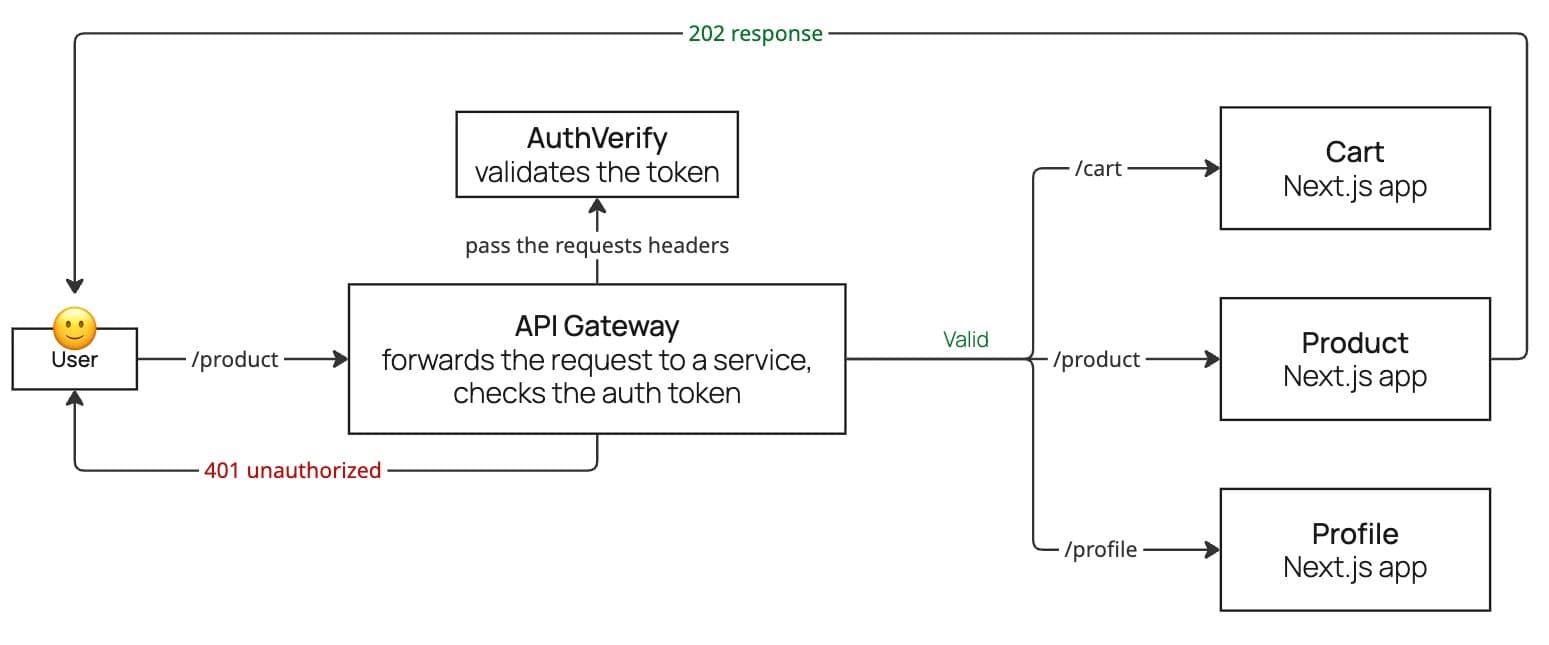
The following Nginx configuration illustrates this pattern:
http {
    # 1. Define where your microservices live
    upstream cart_app    { server localhost:3001; }
    upstream product_app { server localhost:3002; }
    upstream profile_app { server localhost:3003; }

    server {
        listen 80;

        # 2. The Internal Auth Check
        # This is where Nginx "asks" if the token is valid
        location = /auth-verify {
            internal;
            proxy_pass http://your-auth-api/validate;
            proxy_pass_request_body off;
            proxy_set_header Content-Length "";
        }

        # 3. Protected Routes
        location /cart {
            auth_request /auth-verify;
            proxy_pass http://cart_app;
        }

        location /product {
            auth_request /auth-verify;
            proxy_pass http://product_app;
        }

        location /profile {
            auth_request /auth-verify;
            proxy_pass http://profile_app;
        }

        # 4. Error Handling
        # If the auth service returns 401, Nginx passes it to the user
        error_page 401 = @error401;
        location @error401 {
            return 401 "Unauthorized - Invalid Token";
        }
    }
}
Optimizing File Uploads: From Local Storage to Blob Storage
A common pattern in web development is uploading files directly to the same server that handles form submissions. While simple, this approach presents significant challenges for enterprise-level applications.
The Drawbacks of Local File Storage
Storing user-uploaded files directly on your application server introduces three primary risks:
- Low Durability: If files are stored on the server's local disk, a hardware failure or a server crash could lead to permanent data loss.
- Reduced Scalability: Large file transfers consume significant bandwidth and CPU cycles, overwhelming the server and preventing it from handling other user requests efficiently.
- Infrastructure Strain: Moving files from the application server to a more permanent storage location later creates unnecessary internal traffic and complexity.
The Modern Solution: Blob Storage and Signed URLs
The industry-standard approach for handling file uploads is utilizing a Blob Storage service, such as Amazon S3, Google Cloud Storage, or Azure Blob Storage. These services offer:
- High Durability: Files are managed across replica sets, ensuring they remain safe even in the event of hardware failures.
- Increased Availability: By offloading file management, your application server remains free to handle logic and routing.
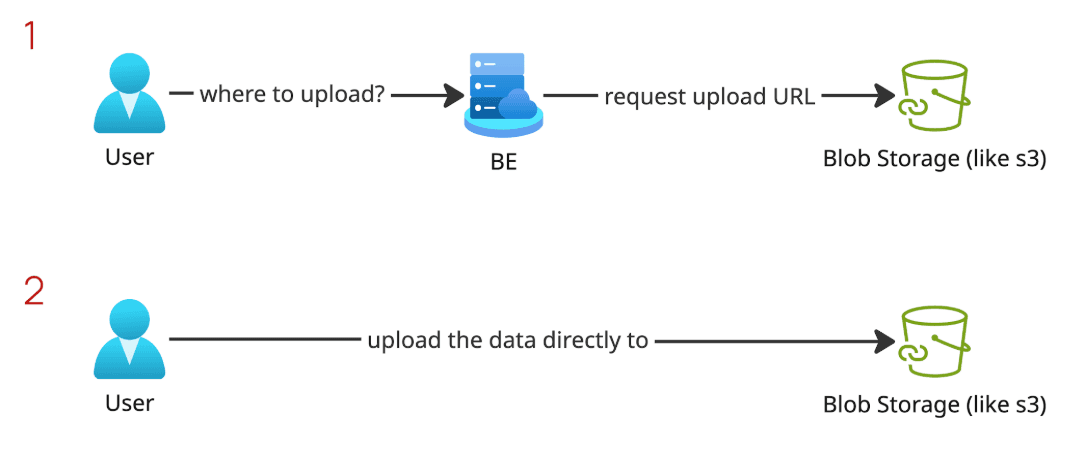
- Direct Uploads via Signed URLs: This is a critical feature for efficiency. Instead of the file passing through your server, your application generates a temporary Signed URL. The user's browser then uploads the file directly to the Blob Storage service.
By implementing direct uploads, you effectively remove the file-transfer burden from your infrastructure. This makes your system more scalable, reduces latency, and ensures your application can handle a significantly higher volume of requests.
Event-Driven Architecture: Scaling High-Volume Interactions
Sometimes, a single user interaction triggers a cascade of internal service invocations. For example, when a user clicks "Add to Cart", a sequence of events typically follows:
- Cart Service: Storing the product in the user’s basket.
- Analytics: Sending data to an external tracking tool.
- Logging: Collecting system logs for monitoring.
- Inventory (SAP): Calling ERP services to deduct product availability.
- ...
When thousands of users perform this action simultaneously, it results in tens of thousands of invocations. If these are handled synchronously (waiting for one to finish before starting the next), the system will quickly become sluggish or crash under the load.
Decoupling with Event-Driven Architecture
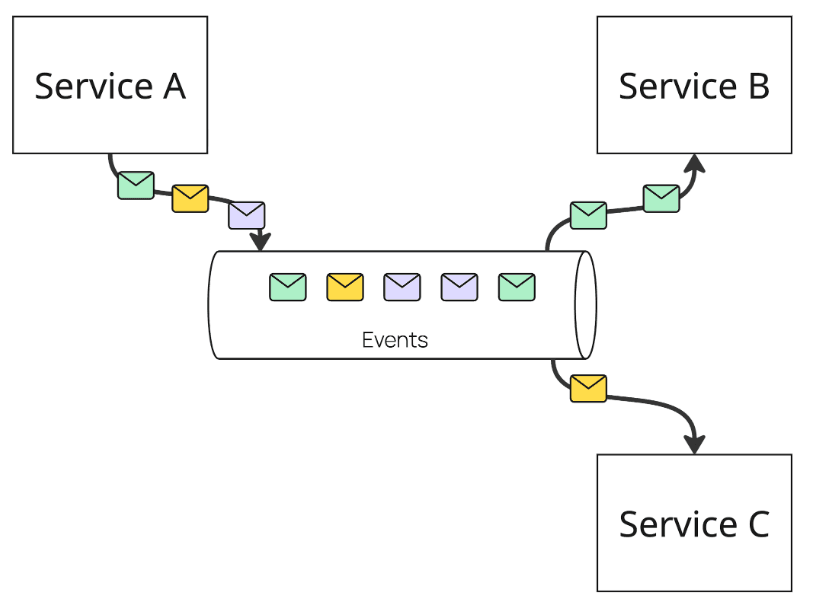
To ensure high performance and scalability, a superior approach is to decouple these services using an Event-Driven Architecture (EDA). Instead of the application waiting for every service to respond, it simply emits an "event."
- Asynchronous Invocations: The primary user action (adding to the cart) is completed immediately, and the downstream tasks are handled in the background.
- High-Throughput Ingestion: Utilizing an event bus like Kafka allows the system to ingest an enormous volume of data. Kafka acts as a buffer, ensuring that even if downstream services (like an older SAP system) are slow, the main application remains responsive to the user.
- System Resilience: If the analytics or logging service goes down, the "Add to Cart" action still succeeds, and the events are processed once the services are back online.
Optimizing Communication Protocols: HTTP/2 and gRPC
Selecting the right communication protocol is vital for maintaining a high-end, modern infrastructure. Upgrading from legacy protocols to HTTP/2 and gRPC significantly boosts throughput, scalability, and overall system performance.
1. The Advantages of HTTP/2
HTTP/2 introduces several key features that solve the bottlenecks of HTTP/1.1:
- Multiplexing: Allows multiple requests and responses to be sent over a single TCP connection, drastically reducing the overhead of opening new connections.
- Binary Framing: Encodes data into a binary format rather than plain text, making it much faster for machines to parse.
- Header Compression (HPACK): Reduces the size of request and response headers, saving bandwidth and improving latency.
Nginx Configuration
To enable HTTP/2 in Nginx, you simply add the http2 parameter to your listen directive:
server {
    listen 443 ssl http2;
    server_name api.example.com;
    # ...
}
2. Service-to-Service Communication: gRPC vs. REST
While REST is common for public APIs, gRPC is often the superior choice for internal service-to-service communication.
- Efficiency: gRPC uses HTTP/2 as its transport layer by default, inheriting all its performance benefits.
- Protocol Buffers (Protobuf): Unlike REST, which typically uses text-based JSON, gRPC utilizes a binary format. This results in significantly smaller payloads and reduces the CPU overhead required for serialization and parsing.
- Strong Typing: gRPC requires defined service contracts, which reduces errors during communication between microservices.
Summary
Scaling Next.js for enterprise means going beyond defaults: defining SLAs and SLOs, understanding the request lifecycle and caching behavior, and layering in CDN, horizontal scaling with a shared cache, API gateways, blob storage, and event-driven or HTTP/2/gRPC-based communication where they fit. No single team can adopt everything at once—and that is fine. Start with the highest-impact, lowest-friction wins (for example CDN and cache headers, or moving auth behind an API gateway), measure against your SLOs, then iterate. The goal is a system that stays performant and maintainable as traffic and complexity grow. Pick one area from this article that matches your current bottleneck and try it in your next sprint.